
Creating a functional small space home office that promotes productivity can be a daunting task for many individuals trying to balance work and home life, especially in today’s fast-paced environment. One often-overlooked component of a successful setup is the anti-fatigue mat, which is just as crucial as the desk itself and plays a significant role in enhancing the overall work experience.
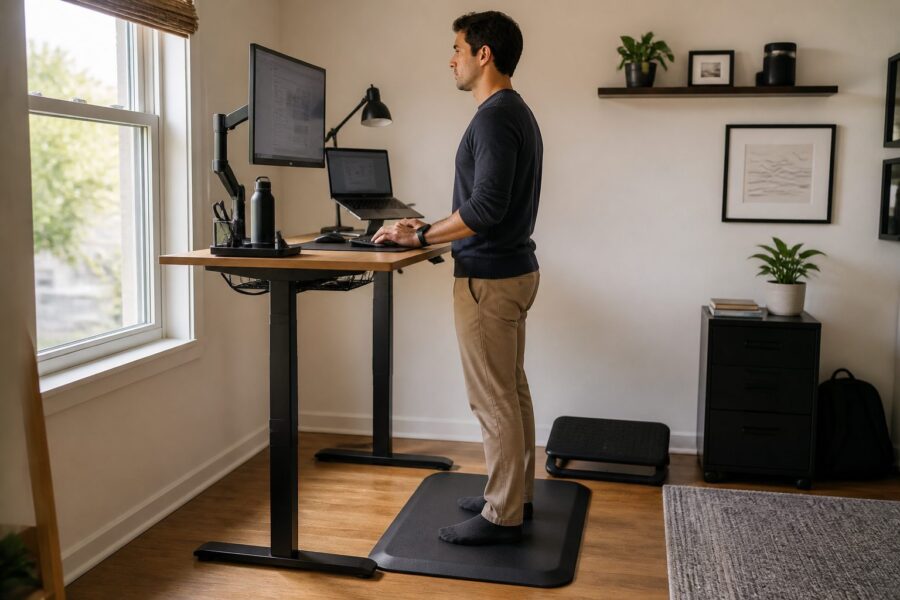
When you’re standing for extended periods, the right mat can significantly enhance comfort and reduce fatigue, allowing you to focus better on your tasks. This article explores the importance of anti-fatigue mats and how they fit into your overall standing desk setup to create an efficient and productive workspace.
From material considerations to accessories that complement your setup, we’ll cover everything you need to know to optimize your workspace for maximum productivity and comfort. Let’s dive into why an anti-fatigue mat is essential for your small space home office and how it can make a world of difference in your daily routine.
Why an Anti-Fatigue Mat is as Important as the Desk Itself
Standing desks promote a healthier work posture and can encourage movement throughout the day, but they can lead to discomfort without the right support and cushioning beneath your feet. An anti-fatigue mat provides the necessary cushioning that helps alleviate pressure on your feet and legs, making a significant difference in how you feel during long work hours.
This mat encourages subtle movements, which can improve circulation and reduce the strain associated with prolonged standing, helping you maintain a more comfortable and productive posture. In short, investing in a quality mat can enhance your overall work experience and help you avoid common discomforts associated with standing desks.
Additionally, standing for long hours can lead to fatigue and discomfort, causing you to lose focus and motivation as the day progresses. A proper anti-fatigue mat can help maintain your energy levels throughout the day, allowing you to concentrate on your work without the distraction of aches and pains.
Many users report increased productivity and decreased discomfort after incorporating an anti-fatigue mat into their setup, which adds to the overall effectiveness of a sit-stand workstation. This makes it a vital component for anyone utilizing a sit-stand desk, as it directly impacts your ability to perform at your best.
Ultimately, the right mat complements the desk, offering a complete standing desk experience that enhances both comfort and functionality. Without it, you may find yourself standing less and sitting more, negating the benefits of a standing desk and undermining your productivity goals.
Materials and Thickness: What Makes a Quality Standing Mat
When choosing an anti-fatigue mat, the materials and thickness play crucial roles in its effectiveness and longevity, directly affecting your comfort level while standing. High-quality mats are generally made from durable foam or gel that provide optimal support and comfort, ensuring that they can withstand daily use without losing their cushioning properties.
A thickness of at least 0.75 inches is recommended to ensure adequate cushioning for your feet, as this provides a balance between comfort and stability. Thicker mats tend to offer better shock absorption and longer-lasting performance, making them a wise investment for your home office setup.
Additionally, consider the surface texture of the mat, as it can significantly influence your comfort level and safety while standing. A slightly textured surface can prevent slipping and encourage movement, while a flat mat may not provide the same benefits, leading to discomfort over time.
Look for mats with a non-slip backing to keep them securely in place, especially on hardwood or tile floors where slipping can pose a hazard. This ensures that your mat remains stable as you shift your weight throughout the day, providing a consistent surface for your feet and enhancing your overall standing experience.
Lastly, make sure the mat is easy to clean and maintain, as a tidy workspace enhances productivity and promotes a healthier working environment. A quality anti-fatigue mat can be a worthwhile investment for your home office, contributing to both your comfort and the aesthetics of your workspace.
Size Guidelines for Your Desk Footprint and Room Layout
The size of your anti-fatigue mat should align with your desk footprint and overall room layout to maximize both comfort and functionality in your small space home office. A mat that is too small may not provide adequate support for your standing position, while one that is too large can overwhelm your workspace and create a cluttered appearance.
As a general guideline, choose a mat that is at least the width of your desk and extends a foot or two beyond the front edge, providing ample space for you to shift your stance and move comfortably. This allows you to change positions throughout the day, which can further enhance circulation and reduce fatigue.
| Desk Size | Recommended Mat Dimensions | Room Layout Consideration |
|---|---|---|
| Small (under 48″) | 24″ x 36″ | Compact spaces |
| Medium (48″ – 60″) | 24″ x 48″ | Standard home office |
| Large (over 60″) | 30″ x 60″ | Spacious layouts |
| L-Shaped Desks | 30″ x 48″ | Corner setups |
Also, consider how the mat fits within your overall office design, ensuring that it complements the aesthetic of your workspace while remaining functional. A well-placed mat can enhance the functionality and style of your workspace, contributing to a cohesive and inviting environment.
Ultimately, the right size mat can greatly contribute to your comfort and productivity, making it easier to focus on your work without distractions. Make sure to measure your desk area before making a purchase to ensure a good fit and maximize the benefits of your anti-fatigue mat.
Additional Accessories That Complete a Standing Desk Setup
To optimize your standing desk experience, consider additional accessories that enhance functionality and comfort, as these can make a significant difference in how you feel throughout the day. Items like monitor risers, keyboard trays, and ergonomic chairs can vastly improve your setup, providing you with the support you need to perform at your best.
These standing desk accessories help create an ergonomic workspace that supports your body, reducing strain and enhancing productivity while allowing you to work in a more natural position. Here are some essential accessories to consider adding to your setup for a more effective and enjoyable working environment:
- Monitor arms for adjustable screen height
- Keyboard and mouse trays to keep your hands in a comfortable position
- An ergonomic chair for sitting breaks
- A document holder to reduce neck strain
- A desk organizer for keeping your space tidy
Each of these accessories can be tailored to meet your unique needs and preferences, allowing you to customize your workspace for maximum comfort and efficiency. Integrating them into your setup can lead to a more effective and comfortable work environment, which is especially important in a small space home office.
Additionally, these accessories can enhance the overall aesthetics of your workspace, contributing to a visually pleasing environment that boosts your mood. A cohesive look not only boosts your mood but also fosters a sense of professionalism, making it easier to maintain focus and productivity during your work hours.
Investing in quality standing desk accessories can transform your small space home office into a highly functional area that encourages productivity and creativity. Make sure to assess your workspace and identify which add-ons will best suit your needs, allowing you to create a personalized and efficient work environment.
Cable Management Considerations When Standing Desks Raise and Lower
Cable management becomes crucial when using a standing desk, as cables need to adapt to the desk’s movement and ensure that they do not become a tripping hazard. Proper organization can prevent tangling and ensure your workspace remains tidy, which contributes to a more efficient working environment free from distractions.
Consider using cable trays, clips, or sleeves to keep cords organized and out of the way, which enhances not only the look of your workspace but also its functionality. This proactive approach reduces clutter and maximizes the available space on your desk, allowing you to maintain an organized and efficient setup.
Furthermore, make sure your cables have enough length to accommodate the desk’s full range of motion, as short cables may restrict movement or even become damaged over time. Ensuring that your cables are appropriately sized will allow you to adjust your desk height smoothly without any hindrance, promoting a seamless transition between sitting and standing.
Employing a cable management system can also help you avoid tripping hazards, promoting safety in your workspace while allowing you to focus on your tasks without unnecessary interruptions. A clutter-free desk contributes to a more productive environment by creating a space that encourages creativity and concentration.
Regularly check your cable management system to ensure everything is functioning smoothly and that there are no loose or frayed cords that could pose a risk. By keeping cables organized and well-maintained, you can focus on your work without distractions and enjoy a safer, more pleasant workspace.
Footwear and Floor Surface: Factors That Affect Standing Comfort
Footwear and the type of floor surface can significantly impact your standing comfort and overall experience while working at a standing desk. Wearing supportive shoes that provide ample cushioning can help reduce fatigue and provide the necessary support for long hours of standing, making a noticeable difference in how you feel at the end of the day.
Hard surfaces like tile or hardwood can exacerbate discomfort and fatigue, making it essential to choose a quality anti-fatigue mat to provide additional support and cushioning. A combination of proper footwear and a supportive mat can create a more comfortable standing experience, allowing you to stay focused and productive throughout your work hours.
- Arch support shoes for better foot alignment
- Soft insoles to enhance comfort
- Non-slip soles for safety
- Cushioned sandals for casual comfort
- Dress shoes with adequate support for professional settings
Additionally, consider your floor type when selecting your anti-fatigue mat, as some mats are specifically designed to work better on hard surfaces. A mat designed for hard surfaces can enhance comfort, making standing for longer periods more manageable and enjoyable as you work through your projects.
Ultimately, the right combination of footwear and anti-fatigue mat can contribute to improved productivity and comfort levels while you work. Evaluating both factors can help you create a comfortable and efficient workspace that supports your needs and enhances your overall work experience.
How to Use a Balance Board on a Standing Mat Safely
Using a balance board in conjunction with your anti-fatigue mat can enhance your core strength and improve posture, making it a great addition to your standing desk setup. However, it’s essential to use it safely to prevent injury and ensure a positive experience while you work.
Make sure your balance board is stable and suitable for use on your mat’s surface, as an unstable board can lead to accidents and injuries. Start slowly to acclimate your body to the new movements, focusing on maintaining balance and proper posture while you engage your core muscles.
Additionally, ensure that you have enough space around you to move freely without obstruction, which helps to minimize the risk of falls or accidents while using the board. A clear area allows you to practice your balance exercises safely and effectively, contributing to a more enjoyable and productive work experience.
Consider incorporating balance exercises into your routine gradually, giving your body time to adapt and strengthen your core over time. This approach enhances your overall standing desk experience and promotes better posture during your work hours.
Finally, listen to your body and take breaks as needed, as balancing on a board can be tiring and may lead to fatigue if overdone. Ensuring that you don’t overexert yourself will help you maintain your focus and productivity throughout the day.
Anti-Fatigue Mat Maintenance and Cleaning Tips
Maintaining your anti-fatigue mat is essential for its longevity and effectiveness, as regular upkeep can significantly enhance its performance. Regular cleaning can prevent dirt and grime from building up, which can affect its support and cushioning properties, ultimately impacting your comfort level while working.
To clean your mat, use a mild detergent and warm water, avoiding harsh chemicals that can damage the surface and reduce its lifespan. Wipe it down with a soft cloth and allow it to air dry completely to ensure it remains in good condition for long-term use.
Additionally, inspect your mat regularly for signs of wear and tear, as identifying issues early can help you address them before they become major problems. If you notice any damage, consider replacing it to maintain the comfort and support it provides, which is crucial for your overall work experience.
Store your mat in a dry place when not in use to prevent mold or mildew from developing, especially important in humid environments where moisture can accumulate. Taking these simple maintenance steps will ensure your mat remains effective for years to come, providing you with the comfort and support you need.
Budget Options vs. Premium Mats: What You Actually Get for the Price
When choosing an anti-fatigue mat, budget options may seem appealing; however, they often lack the quality and durability that premium mats offer. While a budget mat may be cheaper upfront, it might not provide the necessary support for long-term use, leading to discomfort and poor productivity as the weeks go by.
Premium mats typically use higher-quality materials that offer better cushioning, durability, and longevity, making them a worthwhile investment for your home office setup. Investing in a quality mat can lead to improved comfort and productivity in your small space home office, allowing you to work more effectively and enjoyably.
Additionally, premium mats often come with better warranties, providing peace of mind for your investment in a product that enhances your workspace. This means that you can replace it if it doesn’t meet your expectations, ensuring that you’re not stuck with a product that fails to deliver on its promises.
Ultimately, the choice between budget and premium options comes down to your specific needs and usage patterns, as well as your willingness to invest in your comfort and productivity. Assessing your workspace and comfort requirements can guide you towards the best choice for your standing desk setup, ensuring that you make the most informed decision possible.
In conclusion, investing in a quality anti-fatigue mat is essential for enhancing your standing desk experience and creating a workspace that promotes productivity and comfort. With the right accessories and considerations, you can create a comfortable and productive home office that supports your work habits and overall well-being.