
Creating an efficient small space home office setup requires careful consideration of various ergonomic factors that can significantly impact your overall work experience. One of the most critical elements often overlooked is screen height, which plays a significant role in maintaining comfort, minimizing distractions, and enhancing productivity throughout your workday.
When screens are positioned at the wrong height, it can lead to discomfort, eye strain, and long-term health issues that might become more pronounced with extended use. Understanding how to optimize screen height can significantly enhance your workspace experience, making it not only more comfortable but also more conducive to effective work habits.
In this article, we’ll explore the different aspects of screen height, the reasons why it matters, and how using effective tools like laptop risers and monitor arms can transform your small office. From understanding the various types and their adjustability to practical installation tips, we’ll cover all you need to know to create a more ergonomic and functional workspace.
Why Screen Height is a Critical Ergonomic Factor
Screen height is crucial for preventing neck and back pain, promoting better posture, and reducing eye fatigue, all of which are paramount for anyone who spends extended hours working at a desk. When your screen is at eye level, you can maintain a neutral spine position, which is essential for long hours of work and helps to mitigate the risk of developing chronic musculoskeletal issues.
Proper screen height also allows you to keep your gaze slightly downward, which is the most natural position for your eyes and helps minimize strain on your ocular muscles. This adjustment can significantly reduce strain on your neck and shoulders, enhancing overall comfort and making your working hours more enjoyable and productive.
Studies show that ergonomic monitor placement can lead to increased productivity and reduced discomfort, which is particularly important in a world where work demands are ever-increasing. By understanding the importance of screen height, you can create a workspace that not only supports your health but also maximizes your efficiency and output during the workday.
Additionally, an optimal screen height is vital in a small office where space is limited; it enables you to maximize your desk real estate while ensuring your workspace remains comfortable and functional. By arranging your equipment thoughtfully, you can create an environment that fosters creativity and focus amidst the constraints of a smaller area.
Incorporating adjustable tools like laptop risers and monitor arms can help you achieve the perfect screen height tailored to your specific needs. This flexibility allows for a more personalized workspace that adapts to your unique working style, ultimately contributing to a more pleasant and productive work environment.
Laptop Risers: Types, Adjustability and Use Cases
Laptop risers come in various types, each designed to improve screen height and ergonomics according to individual preferences and workspace configurations. From fixed models to adjustable stands, there’s a vast array of options available that can suit any small office setup, allowing you to create a workspace that meets your ergonomic requirements.
Adjustable laptop stands allow you to customize the height to your specific needs, which is particularly beneficial for individuals who share workspaces or alternate between sitting and standing positions. With a simple adjustment, you can switch between these positions throughout the day, promoting better posture and reducing the risk of discomfort or fatigue over time.
Some laptop risers are foldable, making them perfect for travel or temporary setups, which is a great advantage for people who work remotely or frequently move between locations. These portable options enable you to maintain ergonomic monitor placement even when you’re away from your primary workspace, ensuring comfort is always a priority no matter where you are.
In contrast, fixed risers provide a stable and sturdy base for your laptop, ensuring minimal movement during use, which can be beneficial for those who prefer a consistent workspace setup. While they lack adjustability, they can be an excellent choice for those who have a dedicated area and do not require frequent changes to their workstation configuration.
Ultimately, choosing the right laptop riser depends on your specific needs, including your type of work and how you interact with your technology throughout the day. Understanding the different types available can help you make an informed decision that enhances your small office experience and supports your ergonomic goals.
Monitor Arms: How They Free Up Desk Real Estate
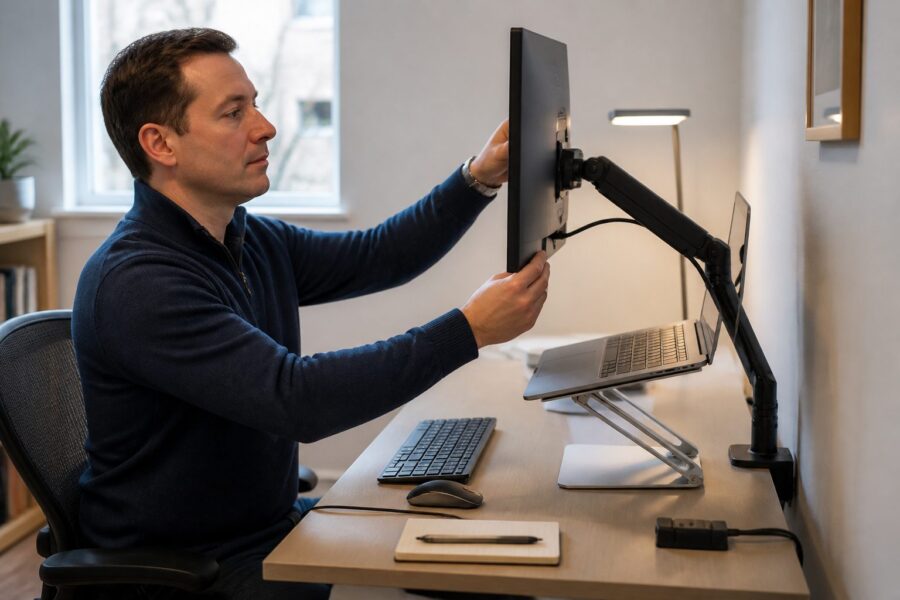
Monitor arms are an excellent solution for small spaces, as they allow screens to be mounted off the desk, thereby freeing up valuable real estate that can be utilized for other essential office items. This not only maximizes your available work surface but also contributes to a cleaner, more organized workspace, which can enhance your overall work experience.
By elevating your monitor, you can also create more room underneath for storage or even a keyboard and mouse setup, which is particularly useful in compact work environments. This vertical adjustment not only enhances ergonomics but also helps in decluttering your desk, making it easier to focus on the tasks at hand without unnecessary distractions.
| Type | Adjustability | Use Case |
|---|---|---|
| Single Monitor Arm | Height and tilt adjustable | Standard office setup |
| Dual Monitor Arm | Height and angle adjustable | Multi-tasking environments |
| Articulating Arm | Full motion adjustable | Flexible positioning needs |
| Fixed Monitor Arm | Static position | Permanent setups |
Choosing the right monitor arm can greatly affect your ability to create a functional small office that caters to your specific working style and preferences. The flexibility offered by these arms allows you to adjust screens easily to suit your ergonomic needs, ensuring that your workspace is both comfortable and efficient.
Comparing Fixed Risers to Articulating Arm Systems
Fixed risers provide a stable height for your laptop but lack the flexibility and adjustability that articulating arm systems offer, making them a less versatile option. While fixed options can be a cost-effective solution for those who do not require frequent changes to their setup, they may not accommodate varying user preferences or ergonomic needs as effectively as more adjustable solutions.
On the other hand, articulating arms offer superior adjustability and can be customized to fit any user’s ergonomic needs, making them ideal for shared workspaces or environments with multiple users. This flexibility can be particularly beneficial in shared workspaces where multiple users need different screen heights and orientations, providing a tailored experience for everyone.
Articulating arms allow for easy adjustments throughout the day, enabling users to switch positions based on their tasks or comfort levels. This adaptability can lead to improved comfort and productivity over time, which is essential for maintaining high levels of efficiency in any work setting.
While fixed risers are generally more straightforward to install and require less assembly, articulating arms can be more complex but offer greater long-term benefits in terms of usability and comfort. Ultimately, the choice between these two options depends on your specific workspace requirements, personal preferences, and how often you anticipate needing to adjust your setup.
Understanding the differences between fixed risers and articulating systems can guide your decision-making process as you create a more ergonomic workspace. Consider your daily tasks and how you interact with your screens when choosing the best option for your small office to ensure that your setup aligns with your work habits.
Weight Limits and Desk Compatibility for Monitor Arms
When selecting a monitor arm, it’s essential to consider the weight limits and desk compatibility of the system you intend to use. Each monitor arm is designed to support a specific weight range, and exceeding this limit can lead to instability, potential damage to both the arm and your monitors, and possible safety hazards in your workspace.
Additionally, ensuring that your desk can accommodate the monitor arm’s mounting system is crucial for achieving a secure and stable setup. Some arms require specific types of desks, such as those with grommet holes or suitable thickness for clamping, which must be considered before making a purchase.
Before purchasing a monitor arm, check the specifications to ensure compatibility with your equipment, including the weight and size of your monitor. This attention to detail will prevent unnecessary headaches during setup and use, allowing you to focus on your work rather than troubleshooting installation issues.
Understanding weight limits can also help you determine whether to opt for a single or dual monitor arm, based on your workspace needs. This can be particularly relevant in a small office where maximizing desk space is a priority and where you want to ensure that your setup is both practical and efficient.
Always reference manufacturer guidelines for weight limits and mounting options to ensure a successful installation that meets your specific requirements. This will help maintain the longevity of your monitor arm and the safety of your workspace, providing you with peace of mind as you work.
Positioning Screens for Dual Monitor Setups in Small Rooms
Setting up dual monitors in a small office can be challenging, but proper positioning is key to maximizing productivity and comfort in a limited space. Ensuring both screens are at the correct height and distance can enhance your workflow, minimize distractions, and reduce physical strain during long working hours.
Consider using a monitor arm system that allows for independent adjustments of each screen to achieve the best possible ergonomic monitor placement. This flexibility will enable you to optimize your setup for both displays, ensuring you can view them comfortably without straining your neck or eyes.
- Place monitors at eye level to maintain a neutral head position.
- Keep screens about an arm’s length away to reduce eye strain and improve focus.
- Angle monitors inward slightly for easy viewing and to create a more immersive workspace.
- Ensure monitor height is consistent to prevent fatigue from looking up or down excessively.
- Use a shared base for stability and organization, enhancing your workspace aesthetics.
By following these guidelines, you can create a comfortable and efficient dual monitor setup even in limited space, which can drastically improve your daily productivity. This thoughtful arrangement will help you maximize your productivity and reduce fatigue, allowing you to work more effectively without feeling overwhelmed by your surroundings.
Pairing Screen Risers with External Keyboards and Mice
Using screen risers effectively involves pairing them with external keyboards and mice to create a fully ergonomic workstation. This combination can significantly enhance your overall ergonomic experience and comfort, allowing you to work for extended periods without the discomfort that often accompanies prolonged computer use.
When your screen is elevated to the correct height, it allows for more comfortable typing and mouse use, which is crucial for maintaining productivity levels. This ergonomic monitor placement reduces strain on your wrists, shoulders, and neck, promoting better posture while working, which can lead to long-term health benefits.
Choosing a keyboard and mouse that complement your workstation can further enhance your setup and provide the necessary support for your hands and wrists. Look for options that offer ergonomic designs, such as split keyboards and contoured mice, to provide maximum comfort during long hours of use.
Integrating these external devices into your small office can free up desk space, improve functionality, and contribute to a more organized work environment. This thoughtful approach ensures that your workspace supports both productivity and comfort effectively, making it easier to focus on your tasks without unnecessary distractions.
Ultimately, pairing screen risers with external keyboards and mice is a smart move for anyone looking to optimize their small space home office. This combination not only elevates your screen but also enhances your overall working experience, making each day more productive and enjoyable.
How to Install a Monitor Arm Without Damaging Rental Property
Installing a monitor arm in a rental property can be daunting, especially if you’re concerned about causing damage to the walls or furniture. However, there are several methods to securely mount your monitor without leaving a trace, ensuring that you can enjoy the benefits of an ergonomic setup while respecting your living space.
One of the best options is to use clamp-mounted monitor arms, which attach directly to the desk’s edge without requiring any drilling. This method does not require drilling holes or making permanent modifications to the property, making it an ideal solution for renters who want to maintain the integrity of their space.
Another method is to use adhesive wall mounts that can support lightweight monitors without damaging the walls or leaving unsightly marks. Ensure that the adhesive is strong enough to hold the weight of your monitor and that it can be removed cleanly without leaving residue behind.
Before installation, check with your landlord about any modifications you plan to make, as this communication can help prevent misunderstandings regarding property damage. Being transparent about your intentions can foster a positive relationship with your landlord and may even open up options for other improvements.
By taking these precautions, you can enjoy the benefits of a monitor arm while keeping your rental property intact and damage-free. This balance of functionality and respect for your living space is essential for renters who want to create an efficient workspace without compromising their rental agreement.
Choosing Between Clamp-Mount and Grommet-Mount Arms
When selecting a monitor arm, you’ll typically encounter two mounting options: clamp-mount and grommet-mount, each with its unique advantages and potential drawbacks. The right choice depends on your desk setup, personal preferences, and how you envision your workspace functioning in both the short and long term.
Clamp-mount arms are easy to install and can be adjusted without tools, making them ideal for temporary setups or for those who wish to frequently change their arrangements. They attach securely to the edge of your desk, allowing for quick adjustments and repositioning when necessary, which can be particularly useful in dynamic work environments.
Grommet-mount arms require a hole to be drilled into your desk but offer a more permanent solution that can enhance stability. This option is generally more stable and can support heavier monitors without wobbling, making it suitable for users who have larger screens or who prefer a fixed setup.
Consider your workspace needs, the type of monitor you’ll be using, and how frequently you anticipate needing to adjust your setup when deciding between the two. The right choice will ensure that your monitor arm setup is both functional and aesthetically pleasing, contributing positively to your overall workspace experience.
Ultimately, whether you choose clamp-mount or grommet-mount arms, both can enhance your small office by providing ergonomic monitor placement that caters to your specific needs. This careful consideration will lead to a more comfortable, efficient, and productive workspace that supports your work habits and lifestyle.