

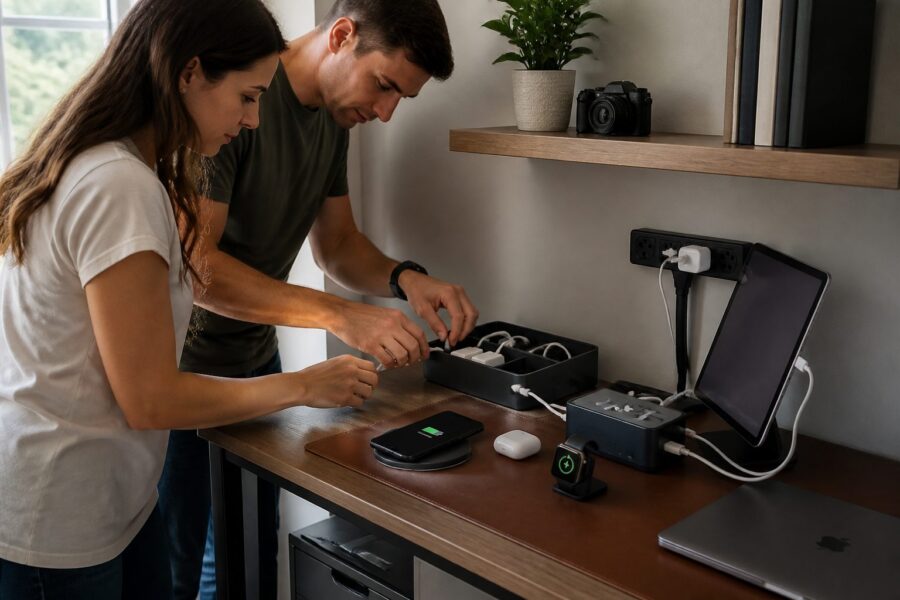
In a small workspace, staying organized is crucial for productivity, especially when you’re juggling various tasks and responsibilities. One of the most frustrating issues that can arise in such environments is dealing with scattered chargers for various devices, which can add to the stress of your workday.
When chargers are strewn across your desk, it creates visual clutter that can hinder your focus and disrupt your workflow. A dedicated charging station hub for your home office can streamline this process, turning a chaotic area into a neat and efficient station for all your devices.
By consolidating all your charging needs in one place, you can create a more efficient and tidy workspace that fosters productivity. This guide will walk you through the essentials of setting up an ideal charging hub for your small office, ensuring that you have everything you need right at your fingertips.
The Problem With Scattered Chargers in a Small Workspace
Scattered chargers not only create visual chaos but also consume valuable desk space that could be used for more productive purposes. In a small workspace, every inch counts, and disorganization can lead to decreased productivity and increased frustration as you search for the charger you need when you need it.
Having multiple chargers can make it difficult to find the right one when you need it, leading to wasted time and unnecessary aggravation. This often leads to wasted time and frustration, making a dedicated charging station essential for maintaining an effective and efficient workspace.
A charging station hub for your home office can help keep your devices powered while minimizing clutter on your desk. By centralizing your charging needs in one organized location, you can focus more on your work instead of constantly searching for the right charger or untangling cords.
Additionally, tangled cords can pose a safety hazard in your workspace, leading to potential trips and falls or damage to your devices. Creating a charging hub allows you to manage these cables efficiently, reducing the risk of accidents and creating a safer working environment.
Ultimately, a well-organized charging solution contributes to a more productive and enjoyable work environment, allowing you to work without distractions. Your small space can be both functional and aesthetically pleasing with the right setup that caters to your charging needs.
What a Proper Charging Hub Includes: Ports, Cables and Power
A proper charging hub should have multiple ports to accommodate various devices, ensuring that all your gadgets can be charged simultaneously. Look for options that include USB-A, USB-C, and even AC outlets for maximum versatility, allowing you to keep all your devices powered up with ease.
Quality cables are essential as well; they should be durable and compatible with your devices to ensure reliable charging. Investing in a multi-device charger desk not only ensures you have everything you need in one location but also allows you to avoid the hassle of tangled cables and misplaced chargers.
Power output is another critical factor to consider when selecting your charging hub, as it can affect how quickly your devices are charged. Ensure that the hub can deliver sufficient wattage to charge all devices simultaneously without slowing down, which can be particularly important during busy work sessions.
Some charging stations come with built-in surge protection to safeguard your devices from power spikes. This feature is particularly important if you live in an area prone to power fluctuations, as it can help prevent damage to your valuable electronics.
Ultimately, the right charging station hub for your home office should combine convenience with safety to create a reliable charging environment. A well-equipped charging hub can make all the difference in maintaining an organized workspace while ensuring that all your devices remain powered and ready to use.
Choosing Between Desktop, Drawer and Wall-Mounted Charging Stations
When selecting a charging station, consider the available space in your home office and how each option might fit into that space. Desktop charging stations are great for easy access and quick charging but can take up valuable surface area that might be needed for other important tasks.
Drawer systems can hide chargers and cables away from sight, promoting a clean, cable-free desk setup that many find appealing. However, it may be less convenient to access your devices when they’re hidden away, leading to potential delays when you need to charge your phone or tablet quickly.
| Type | Pros | Cons |
|---|---|---|
| Desktop | Easy access | Takes up desk space |
| Drawer | Out of sight | Less accessible |
| Wall-Mounted | Saves desk space | Requires installation |
Wall-mounted charging stations can save precious desk space, providing a sleek and modern look to your home office, but they require installation, which might not be ideal for everyone. Weigh the pros and cons of each type to find what best suits your needs, taking into account both functionality and aesthetics.
Ultimately, the choice depends on your personal workflow and the size of your workspace, as well as your charging habits and preferences. A thoughtful selection can enhance both the functionality and aesthetics of your office, creating an environment that works for you.
How Many Ports Do You Actually Need for Your Device Count
Determining how many ports you need is essential for an effective device charging organizer that serves your specific needs. Start by listing all the devices you plan to charge simultaneously, including phones, tablets, and laptops, to get a clear picture of your requirements.
Next, consider future purchases as well, as tech needs can change frequently and you may find yourself acquiring new devices over time. The general rule of thumb is to have at least one extra port beyond your current device count to accommodate any additional gadgets you may acquire.
| Device Type | Count | Suggested Ports |
|---|---|---|
| Smartphone | 2 | 3 |
| Tablet | 1 | 2 |
| Laptop | 1 | 2 |
| Smartwatch | 1 | 1 |
By calculating your needs accurately, you can avoid purchasing a charging hub that’s too small and limits your ability to keep all your devices charged. A well-planned charging station ensures that all devices remain powered without hassle, allowing you to focus on your tasks without interruption.
Cable Length Optimization: Reducing Slack Without Cutting Access
Cable management is vital for maintaining a tidy workspace that promotes efficiency and focus. Long cables can create unsightly slack, making your charging station look cluttered and detracting from the overall aesthetic of your workspace.
To optimize cable length, consider using cable ties or clips to secure excess slack, which helps keep your workspace neat and organized. This not only improves the visual appeal of your charging station but also ensures that your devices can still be easily accessed when you need them.
Another effective strategy is to use shorter cables for devices that are close to the charging hub, reducing the amount of visible cable and creating a cleaner aesthetic. This small adjustment can make a big difference in how organized your workspace feels.
Furthermore, utilizing cable management boxes can hide cables while maintaining accessibility, providing a functional yet stylish solution. These boxes can be placed near your charging station to keep everything organized and out of sight, allowing your workspace to remain uncluttered.
Ultimately, an organized cable setup can significantly enhance your workspace’s appearance and functionality. A tidy environment leads to better focus and productivity in your small office, creating a more enjoyable work experience.
Wireless Charging Pads and Their Role in a Compact Hub
Wireless charging pads are an excellent addition to any charging station hub for your home office, offering a modern solution to charging your devices. They provide convenience by eliminating the need for cables, making your setup more streamlined and visually appealing.
These pads can accommodate multiple devices, allowing you to charge smartphones and other gadgets simultaneously without the clutter of cords. This feature is particularly useful for maintaining a cable-free desk setup, which many people find to be more aesthetically pleasing.
- Easy to use, simply place your device on the pad
- Reduces cable clutter, creating a cleaner workspace
- Multiple device compatibility for versatile charging options
- Portable options available for on-the-go charging
- Faster charging for select devices, depending on the model
While wireless charging may not be as fast as traditional charging methods, it offers a unique advantage in terms of convenience and ease of use. For small spaces, incorporating wireless pads can greatly enhance your charging experience while simplifying your overall setup.
Incorporating wireless charging into your charging station can simplify your workspace even further, allowing for a more minimalist approach to cable management. With fewer cables, you can focus more on your tasks and less on cable organization, promoting a more productive work environment.
Safety Considerations: Amperage, Surge Protection and Heat
Safety is a crucial aspect when setting up your charging station, as improper charging can lead to device damage or even hazards. Always check the amperage specifications of your charging hub to ensure it meets the needs of all your devices and prevents overheating.
Surge protection is another important feature to look for in a charging station, as it can protect your devices from voltage spikes that could cause irreversible damage. This added layer of security is particularly important if you live in an area prone to power fluctuations or storms.
Heat management is also vital; excessive heat can harm your devices over time, leading to reduced battery life or malfunctioning electronics. Choose a charging hub designed to dissipate heat effectively to ensure longevity and reliable performance for all your gadgets.
Regularly inspect your cables and chargers for signs of wear and tear to ensure that they remain in good condition and do not pose a risk. This simple practice can prevent potential hazards in your workspace, allowing you to work with peace of mind.
By prioritizing safety, you can create a reliable charging environment that keeps your devices powered and your mind at ease. A secure charging station will not only support your electronic devices but also contribute to a more productive and stress-free work atmosphere.
Labeling and Routing Cables Inside a Charging Station
Labeling cables can significantly improve your charging station’s organization and efficiency, making it easier to manage multiple devices. When each cable is clearly marked, you can quickly identify which device it belongs to, saving time and reducing frustration during your workday.
Consider using color-coded labels for added clarity and to easily differentiate between devices. This simple method can save you time and frustration when connecting devices to the charging station, allowing for a smoother workflow.
Routing cables effectively is just as important as labeling them, as a well-organized cable setup can prevent tangles and confusion. Use cable clips or sleeves to guide cables neatly along your desk or inside the charging hub, creating a clean and organized appearance.
Employing a structured cable routing system can prevent tangles and surprises, which can disrupt your work and lead to unnecessary distractions. A well-organized cable setup will contribute to a more pleasant workspace, allowing you to focus on your tasks at hand.
Incorporating these practices will enhance both functionality and aesthetics, making your charging station a valuable component of your workspace. A streamlined charging station will elevate your small office experience, fostering productivity and creativity.
DIY Charging Station Ideas Using Standard Cable Boxes or Trays
Creating a DIY charging station can be both fun and functional, allowing you to customize your workspace to fit your unique style. Using standard cable boxes or trays, you can design a personalized charging hub that fits your space and meets all your charging needs.
Start by gathering materials such as cable boxes, trays, or even decorative baskets that can help contain your chargers and cables in a stylish way. These simple items can transform a cluttered charging area into an organized and visually appealing part of your home office.
Consider adding a power strip inside the cable box for easy access to multiple outlets, which will effectively convert your standard box into a multifunctional charging station. This small adjustment can significantly enhance the functionality of your DIY charging station.
You can also paint or decorate the boxes to match your office decor, infusing your personal style into your workspace. Personalizing your charging station will make it a unique addition to your workspace, reflecting your taste while providing practicality.
With a little creativity and effort, your DIY charging station can blend seamlessly into your home office, providing both organization and style. Enjoy the benefits of an organized, efficient, and stylish charging solution that enhances your productivity and work experience.


