

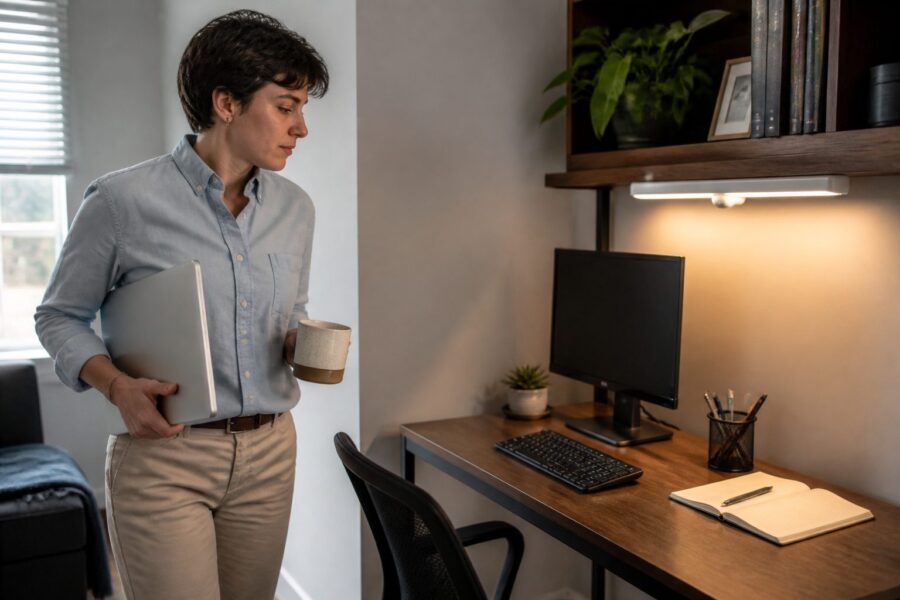
Setting up an efficient home office requires thoughtful consideration of various elements, including lighting and its impact on productivity and comfort. Motion sensor lighting can significantly enhance your workspace by providing illumination precisely when you need it, while conserving energy when you don’t, thus creating a more effective working environment for anyone who spends long hours at their desk.
In the context of a home office, automatic office lighting solutions mean never fumbling for a switch while your hands are full with essential documents or tools. This hands-free desk light feature makes motion sensors an ideal choice for optimizing both your productivity and comfort, allowing you to focus entirely on your tasks without any interruptions.
As remote work continues to grow in popularity and become a staple of modern employment, enhancing our workspace with smart technology becomes more essential than ever for maintaining efficiency. Clever lighting solutions like motion sensors can ultimately lead to a more inviting and efficient work environment, making the home office a place where creativity and productivity can flourish.
Why Motion Sensor Lighting Belongs in a Home Office
Motion sensor lights offer convenience and efficiency, especially in the home office environment where multitasking is often necessary. They provide instant illumination as you enter the room, ensuring you’re never left in the dark when you need to work, which can help set a productive tone for your work sessions.
With the ability to turn on automatically, these lights eliminate the need to reach for a switch or fumble in the dark, which can be distracting and frustrating. This feature is especially beneficial when your hands are occupied with paperwork or equipment, allowing for a seamless transition into your work tasks without any unnecessary delays.
Additionally, motion sensor lights contribute to energy savings by turning off automatically when you leave the room, which is particularly useful in a home office where you may step away frequently. This automatic feature not only reduces electricity costs significantly but also promotes a more sustainable lifestyle by minimizing unnecessary energy consumption.
In a home office, where time is often of the essence and distractions can easily arise, these lights help maintain focus and minimize interruptions. The convenience of having a motion sensor light in your home office enhances productivity and creates a more organized, efficient workspace, facilitating a better work-life balance.
Moreover, the modern design of these lights can aesthetically complement your office decor, blending in seamlessly with various styles and themes. They merge functionality with style, ensuring your workspace remains visually pleasing and conducive to creativity, which is essential for a productive environment.
How PIR and Microwave Motion Sensors Differ in Office Settings
Passive Infrared (PIR) sensors and microwave sensors serve similar purposes in providing automatic lighting but operate differently based on distinct technologies. PIR sensor workspaces detect body heat and movement, while microwave sensors emit waves that can sense motion through walls and obstacles, making them suitable for various office layouts and needs.
In smaller home office setups, PIR sensors may be ideal due to their lower sensitivity and ease of use, making them less likely to trigger from small, non-human movements. They are particularly well-suited for stationary tasks like working at a desk, where consistent lighting is crucial for maintaining focus without unnecessary distractions.
| Feature | PIR Sensor | Microwave Sensor |
|---|---|---|
| Detection Type | Heat and movement | Microwave pulses |
| Range | Typically up to 30 feet | Can exceed 30 feet |
| Installation | Easy, often surface-mounted | Requires careful placement |
| Cost | Generally lower | Generally higher |
Microwave sensors, while more sensitive and capable of covering larger areas, can sometimes lead to false triggers from non-human movements, such as pets or objects moving in the room. However, they may be better suited for larger office spaces where more extensive coverage is essential for ensuring that all areas are adequately lit.
Choosing between these two types of sensors ultimately depends on the specific layout and needs of your home office, as well as your personal preferences for lighting consistency. Understanding their differences can help you make an informed decision that best fits your working environment and enhances your overall productivity.
Placement Strategies to Avoid False Triggers While Seated at a Desk
Proper placement of motion sensor lights is crucial for maximizing their effectiveness in a home office and ensuring they work as intended without unnecessary interruptions. To avoid false triggers while seated at your desk, consider positioning sensors away from areas with frequent movement, such as doorways or walkways.
For instance, placing a PIR sensor above the entrance can help it detect when you enter the room without being influenced by your movements at the desk, which can lead to distractions. This strategic positioning minimizes the chances of the light turning on and off unnecessarily, ultimately allowing you to maintain focus on your tasks.
Another effective approach is to install the sensors at a height where they can best capture entry movements without picking up your seated activities, which can cause false triggers. Aim for a height between 6 to 8 feet, which is optimal for detecting larger body movements while minimizing interference from smaller movements that occur at your desk.
Additionally, consider the field of view of the sensor when determining its placement in your office. A narrow field of view can reduce false triggers by focusing solely on the entrance rather than the entire room, ensuring the light only activates when truly necessary.
Finally, testing the sensor after installation can help identify any potential issues with its placement or sensitivity settings. Adjusting the sensor’s angle or height can further refine its performance and ensure reliable operation, creating a more effective and user-friendly lighting solution.
Choosing Between Battery-Powered and Hardwired Motion Sensor Lights
When selecting motion sensor lights for your home office, you’ll find two main types: battery-powered and hardwired options. Battery-powered lights offer flexibility in placement, allowing you to install them anywhere within your office without concern for electrical outlets or complicated wiring.
On the other hand, hardwired motion sensor lights provide a more permanent solution that typically offers brighter illumination and longer-lasting performance due to their direct connection to the electrical system. They require professional installation but can integrate seamlessly into your existing electrical system, adding a layer of convenience and reliability.
Battery-powered options are ideal for renters or those who frequently change their office layout, as they can be easily moved without the need for renovation. They are also easier to replace when the batteries run low, ensuring you won’t be left in the dark unexpectedly, which can disrupt your workflow.
Hardwired lights, however, typically have a more robust design and may come equipped with additional features like dimming or color temperature adjustments, which can enhance your overall working experience. This capability allows you to adapt the lighting to suit various tasks, whether you need bright lights for focused work or softer lights for relaxation breaks.
Ultimately, the choice between battery-powered and hardwired options depends on your specific needs and preferences, as well as your office environment. Consider factors such as your office layout, budget, and how often you plan to modify your space when making your decision, ensuring you select the best option for your unique situation.
Setting the Right Delay Timer for Extended Desk Sessions
One of the crucial features of motion sensor lights is the delay timer, which determines how long the lights remain on after detecting motion in the area. Setting the right delay timer is essential for maximizing productivity during extended desk sessions, allowing you to work without interruptions from the lighting system.
If the timer is set too short, you may find the lights turning off while you’re still working, causing unnecessary disruptions and breaking your concentration. Conversely, a timer set too long can lead to wasted energy when you leave the space, resulting in unnecessary electricity consumption and increased costs.
Finding a balance is key, and many motion sensors allow you to adjust the delay timer to suit your individual work style and habits. A delay of around 10 to 15 minutes is often ideal for most home office setups, allowing enough time for short breaks without losing lighting access.
By customizing the settings, you can create an environment that’s conducive to focused work without interruptions from flickering lights. This thoughtful approach to your lighting can significantly enhance your overall productivity, making your home office a more enjoyable place to work.
Take time to experiment with different settings until you find the one that works best for your workflow, as this small adjustment can make a big difference in your daily routine. The right delay timer can help you maintain your focus on the task at hand while ensuring that you have adequate lighting throughout your work sessions.
Motion Sensors in Closet Offices and Dark Alcoves
Closet offices and dark alcoves often present unique lighting challenges, making motion sensors particularly useful in these compact and often neglected spaces. The limited size and confined nature of these areas can make traditional lighting options less practical or even impossible to install effectively.
By installing motion sensor lights in these tight spots, you can ensure that the space remains well-lit as you enter, enhancing visibility and accessibility. This hands-free desk light solution is particularly beneficial in areas where you may be accessing files, supplies, or equipment, allowing you to operate efficiently without interruption.
- Compact design for tight spaces
- Easy installation without professional help
- Energy-efficient operation, saving on bills
- Immediate illumination upon entry
- Ideal for small and often-overlooked spaces
Additionally, these sensors can help keep your workspace organized by preventing clutter from taking over the lighting controls, which is essential for maintaining a tidy environment. With automatic lighting, you can maintain a neat and efficient workspace, ensuring that you can focus on your work without being distracted by disorganization.
Incorporating motion sensors into closet offices enhances the functionality and usability of these spaces while ensuring you have access to light when you need it most. This can significantly improve your overall experience in these unconventional work areas, making them more user-friendly and effective.
Integrating Motion Sensor Lights With Smart Home Platforms
Integrating motion sensor lights with smart home platforms adds an extra layer of convenience to your home office, allowing for a more streamlined and efficient work environment. This integration allows you to control your lighting through voice commands or mobile apps, making it easier to adjust lighting settings without interrupting your workflow.
Many modern motion sensor lights are compatible with popular smart home systems like Google Home and Amazon Alexa, providing you with multiple options for managing your lighting. This compatibility means you can adjust settings, monitor energy usage, and create lighting schedules directly from your smartphone or through voice commands, enhancing your overall experience.
Additionally, smart home integration allows for more advanced features like remote access and automation, making your home office even more user-friendly. For example, you can program your lights to turn on as you approach your office, enhancing the seamless experience of entering your workspace and eliminating the need to manually activate the lights.
These smart solutions not only improve your office’s functionality but can also be customized to suit your preferences, ensuring that you have complete control over your lighting. This level of control ensures that your home office environment is always tailored to your needs, which can significantly boost your productivity and comfort.
Overall, integrating motion sensors with smart home systems can transform your home office into a highly efficient workspace that adapts to your lifestyle. This tech-savvy approach maximizes both convenience and productivity, allowing you to focus on your work without distractions.
Energy Savings From Automatic Lighting in a Work-From-Home Setup
One of the most significant benefits of using motion sensor lighting in your home office is the potential for substantial energy savings. By utilizing automatic lighting, you ensure that lights are only on when needed, which can drastically reduce your electricity bill over time, making this a financially wise choice for any remote worker.
As we spend more time working from home, energy costs can add up quickly, making efficient lighting a priority for both environmental and financial reasons. Motion sensors help mitigate this by turning off lights when the space is unoccupied, leading to reduced waste and lower energy consumption, which benefits both your wallet and the planet.
In addition to saving money on your electricity bill, this approach is also environmentally friendly and contributes to a more sustainable lifestyle. By minimizing energy consumption, you contribute to a greener future while still enjoying the benefits of a well-lit workspace that enhances your productivity and comfort.
Overall, incorporating motion sensor lights into your home office not only aids in productivity but also supports your commitment to energy efficiency, making them a smart investment for any remote worker. This dual benefit of improved functionality and reduced costs makes motion sensor lighting an excellent addition to your work-from-home setup.
As more individuals transition to permanent remote work, the adoption of energy-efficient solutions like motion sensor lighting becomes increasingly important for creating a sustainable work environment. Motion sensors are a small yet impactful change that can make a big difference in your work-from-home setup, ultimately enhancing your overall experience.
Combining Motion Sensors With Dimmable Fixtures for Smooth Transitions
Combining motion sensors with dimmable fixtures can create a versatile lighting solution for your home office environment, allowing for more tailored illumination based on the time of day and specific tasks at hand. This combination allows for smooth transitions between different lighting levels, making it easier to adjust the ambiance to suit both your work needs and personal preferences.
Dimmable fixtures provide the flexibility to adjust brightness levels, which can significantly reduce eye strain during long work sessions by ensuring that the lighting is comfortable and not overly harsh. When paired with motion sensors, you can enjoy the benefits of automatic lighting while maintaining control over the ambiance of your workspace, creating a more personalized and enjoyable environment.
For instance, having bright lighting during active tasks can enhance focus and productivity, while softer lighting is perfect for relaxation, brainstorming, or creative thinking sessions. This adaptability fosters a more comfortable and productive working environment, ensuring that you can easily switch between different modes of work as needed.
Moreover, using dimmable fixtures in conjunction with motion sensors can help create a more inviting atmosphere, which is important for maintaining motivation and overall morale. This not only boosts your mood but can also enhance creativity and inspire motivation, leading to higher-quality work output and satisfaction.
In conclusion, integrating these two technologies can significantly enhance your home office experience by prioritizing both convenience and personalization. By creating a workspace that truly meets your needs, you can maximize your productivity and enjoy a more satisfying work environment.


