

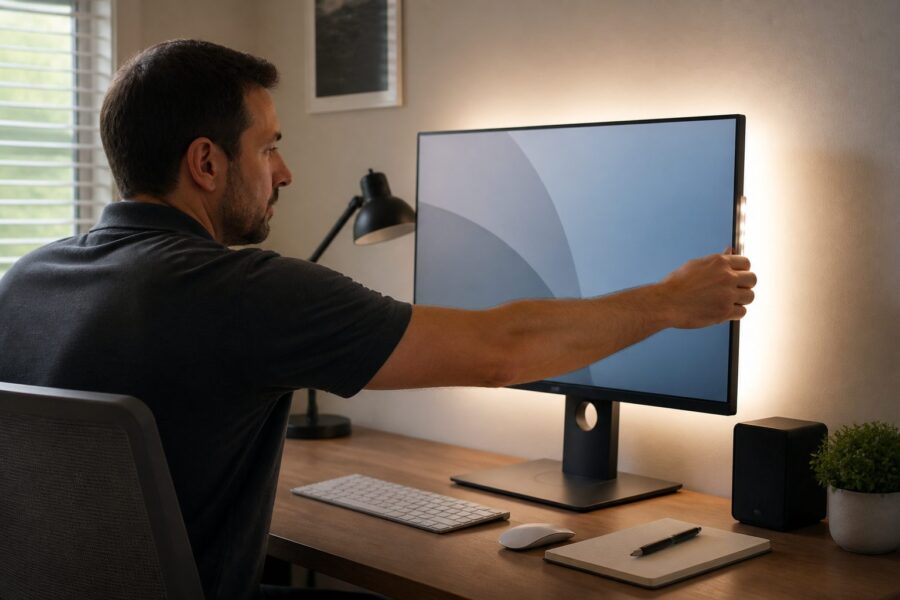
In today’s digital age, creating a comfortable home office is essential, especially when working long hours in front of a monitor. One innovative solution that has gained popularity in recent years is bias lighting, which not only enhances the aesthetics of your workspace but also significantly improves its functionality, making it a valuable addition for anyone who spends considerable time in front of screens.
Bias lighting refers to the illumination placed behind a monitor to reduce contrast and improve overall visual comfort, which is particularly important for long-duration tasks. This concept originated from the need to alleviate the eye strain commonly experienced when staring at bright screens against dark backgrounds, providing a more balanced lighting environment.
As remote work becomes more prevalent in today’s workforce, understanding the numerous benefits of bias lighting in a home office has become increasingly crucial. This article will delve into the science behind bias lighting, along with practical tips and strategies for implementing it effectively in your workspace to enhance both comfort and productivity.
What is Bias Lighting and Where Did It Come From
Bias lighting is a specialized form of ambient light that is strategically placed behind a monitor to provide a gentle and soothing glow that effectively reduces the harshness of screen glare. This technique originally found its roots in the film industry, where it was employed to enhance viewing experiences in dark environments, ensuring that audiences had a more enjoyable experience without straining their eyes.
The concept has since been widely adopted by home office users who seek to create a more inviting and comfortable atmosphere while simultaneously reducing eye strain and fatigue. By providing a soft, diffuse light source, bias lighting helps to balance the brightness of the screen with the surrounding environment, creating a harmonious and visually pleasing workspace.
Initially, bias lighting was implemented using traditional incandescent bulbs or fluorescent lights, which were common at the time. However, advancements in technology have led to the widespread adoption of LED lighting for this purpose, making bias lighting more energy-efficient, versatile, and adaptable to various user preferences.
LED bias lighting is not only energy-efficient but also comes in a variety of colors and brightness levels, allowing users to customize their workspace according to personal tastes and specific needs. This flexibility makes it possible for individuals to create a unique and tailored lighting environment that complements their workflow and enhances their overall productivity.
As more individuals embrace remote work and spend extended periods at their desks, the relevance and importance of bias lighting continue to grow. Whether for gaming, design, or general office work, properly implemented bias lighting can significantly enhance the overall work experience by creating an environment that encourages focus and reduces eye strain.
How Bias Lighting Reduces Eye Strain Scientifically
The science behind bias lighting lies in its ability to reduce the contrast between the bright screen and the surrounding environment, which can be a significant factor in eye strain. By minimizing this contrast, bias lighting effectively enhances visual comfort during extended periods of screen time, allowing users to work more efficiently without discomfort.
Numerous studies have shown that ambient lighting can significantly lower the risk of digital eye strain, which is also known as computer vision syndrome. By providing a uniform light source in the workspace, bias lighting helps maintain a relaxed state for the eyes, reducing the likelihood of fatigue and discomfort associated with prolonged computer use.
When using a monitor without bias lighting, the eyes must constantly adjust to the varying brightness levels of the screen and the surrounding environment. This continuous adjustment can lead to discomfort, fatigue, and even headaches, making bias lighting an effective and practical solution for alleviating these common issues.
Moreover, the presence of bias lighting can help reduce glare on the screen, which is another significant contributor to eye strain and discomfort. By softening the visual transition from the screen to the surrounding space, users can enjoy a more comfortable and pleasant viewing experience, which can help maintain focus during work tasks.
Incorporating bias lighting into your home office setup not only enhances aesthetics but also contributes to overall well-being and comfort while working. This simple addition can help create a healthier work environment, particularly for those who spend long hours in front of the computer, reducing the risk of eye strain and improving overall productivity.
Choosing the Right Color Temperature for Bias Lighting
Selecting the appropriate color temperature for bias lighting is crucial for maximizing its benefits and achieving the desired atmosphere in your workspace. Generally, a color temperature between 2700K and 3000K is recommended for creating a warm and inviting atmosphere that promotes relaxation and comfort during work hours.
Warmer lights create a cozy environment that reduces harsh contrasts with screen content, making it easier on the eyes during long periods of use. On the other hand, cooler temperatures, typically around 4000K to 5000K, can promote alertness and focus, making them particularly suitable for tasks that require high levels of concentration and attention to detail.
| Color Temperature (K) | Effect | Recommended Use |
|---|---|---|
| 2700K-3000K | Warm and inviting | Relaxed tasks |
| 3000K-4000K | Neutral | General use |
| 4000K-5000K | Cool and alert | Focus-intensive work |
| 5000K+ | Daylight-like | Creative tasks |
Choosing the right color temperature can greatly enhance your productivity and comfort while working, allowing you to tailor your environment to your specific tasks. It’s essential to consider not only personal preferences but also the type of work being performed when making this decision, as different tasks may benefit from different lighting conditions.
LED Strips vs. Dedicated Bias Light Bars: Which Performs Better
When it comes to bias lighting, two popular options are LED strips and dedicated bias light bars, each offering unique advantages for users. Making the right choice between these two options depends on your specific needs, preferences, and the overall setup of your workspace.
LED strips are highly versatile and can be cut to size, allowing for customizable installation behind monitors of various dimensions. They offer a variety of color options and brightness levels, making them ideal for those who desire flexible ambient monitor lighting that can be adjusted based on the task or mood.
On the other hand, dedicated bias light bars are designed specifically for providing optimal lighting solutions for computer monitors. These bars often come equipped with built-in features such as adjustable brightness and color temperature, enhancing their usability and allowing for a more tailored lighting experience.
While both options can effectively reduce eye strain and improve visual comfort, dedicated bias light bars may offer superior performance in terms of consistency and light distribution. However, for many users, LED strips can be a more affordable and adaptable choice that allows for creative and personalized installations.
Ultimately, your choice should depend on your individual preferences, budget constraints, and the specific requirements of your workspace. Evaluating the pros and cons of each option will help you make an informed decision that aligns with your needs and enhances your overall work environment.
Placement and Distance Guidelines Behind Different Monitor Sizes
Proper placement of bias lighting is essential for achieving optimal results in eye strain reduction and enhancing visual comfort. Guidelines suggest placing the light source about 2 to 4 inches behind the monitor for the best possible effect, ensuring that the ambient light complements the screen output without being overly intrusive.
The recommended distance may vary depending on the size of the monitor, with larger screens often requiring more distance to achieve the desired ambient effect. For example, a 27-inch monitor may benefit from a distance of 4 to 6 inches, while a smaller 21-inch screen works well with a 2 to 4-inch placement to create a pleasing ambient glow.
To ensure even light distribution, it’s crucial to position the bias lighting in a manner that prevents direct glare into your eyes, which can detract from the overall experience. This thoughtful placement helps create a gentle glow that enhances your workspace without causing distractions or discomfort during use.
For ultrawide monitors, a longer LED strip or bias light bar may be necessary to cover the entire width effectively. Ensuring proper coverage can significantly improve the overall lighting experience in your home office, creating a more immersive and comfortable working environment.
By following these placement and distance guidelines, you can effectively utilize bias lighting to enhance your workspace and improve your overall productivity. Proper implementation of bias lighting will lead to greater comfort and efficiency during long hours of work, allowing you to focus on tasks without the burden of eye strain.
Brightness Calibration: Matching Bias Light to Screen Output
Calibrating the brightness of your bias lighting is vital for achieving the best visual comfort and ensuring an optimal working environment. The primary goal is to match the output of the bias light with the brightness of your monitor screen, resulting in a seamless viewing experience that minimizes eye strain.
To achieve this balance, start by adjusting the monitor’s brightness and contrast settings to suit your preferences and work requirements. Afterward, fine-tune the bias light’s brightness until it feels comfortable and well-balanced with the screen output, creating a harmonious lighting environment.
- Test with white images to gauge brightness levels
- Adjust settings during different times of day for consistency
- Use a light meter for precision, if available
- Consider the ambient light present in your room
- Fine-tune the settings as needed to maintain comfort
By following these steps, you can ensure that your bias lighting complements your monitor effectively and enhances your overall work experience. Proper calibration contributes significantly to reducing eye strain and enhancing focus during your work hours, allowing for increased productivity and comfort.
Smart Bias Lighting That Syncs With Your Screen Content
Incorporating smart bias lighting into your home office can elevate your workspace experience to new heights by adding a dynamic element to your lighting setup. These advanced lighting systems are designed to sync with your monitor content, adjusting colors and brightness in real-time to enhance immersion and visual comfort.
Smart bias lighting is particularly beneficial for gamers and content creators, as it provides a more immersive experience that captures the essence of the on-screen action. This innovative technology not only helps to reduce eye strain but also adds a visually engaging element to your workspace, making it more enjoyable and stimulating.
Many smart bias lighting solutions can be controlled conveniently via smartphone apps or voice commands, offering a level of customization and ease of use that traditional lighting options may lack. By integrating these advanced systems into your home office, you can create a personalized work environment that adapts to your needs and preferences.
Additionally, smart lighting can be programmed to follow a schedule, adjusting automatically based on your working hours and the natural light in your environment. This feature helps maintain optimal lighting conditions throughout the day, promoting a balanced work-life approach and improving overall well-being.
As technology continues to advance, the possibilities for bias lighting in home offices expand, providing users with exciting opportunities to enhance their workspace. Smart bias lighting not only adds a layer of sophistication to your environment but also minimizes eye strain, allowing for a more enjoyable and productive work experience.
Installation Methods That Do Not Damage Walls or Monitors
Installing bias lighting in your home office should be a simple process that does not result in damage to walls or monitors, allowing for a clean and efficient setup. Fortunately, various non-invasive methods are available to ensure easy installation while maintaining the integrity of your workspace.
For LED strips, the adhesive backing makes installation straightforward and intuitive, allowing you to peel and stick them directly onto the monitor or wall without the need for additional tools. Additionally, using removable mounting clips can secure the lights in place without leaving residue or causing damage, ensuring a hassle-free installation process.
For dedicated bias light bars, many models come equipped with adjustable stands or mounts that can be positioned securely without the use of adhesives. This feature allows for easy adjustment and repositioning of the lights without harming your workspace, providing a user-friendly solution for optimal lighting.
Another innovative option is to use magnetic strips that can attach to metal surfaces, providing a secure yet easily removable installation method. This approach allows for quick installation and removal, enabling you to switch out lights or reposition them as needed without any fuss.
By employing these various installation methods, you can enjoy the benefits of bias lighting in your home office without worrying about damage to your walls or monitors. These solutions ensure a versatile and user-friendly setup that enhances your workspace experience while maintaining its aesthetic appeal.
Combining Bias Lighting With Task Lamps for a Layered Setup
Creating a well-lit home office environment often involves combining bias lighting with task lamps for a layered lighting approach that maximizes both functionality and aesthetics. This thoughtful combination can significantly enhance your workspace, providing the right balance of light for various tasks and activities throughout your workday.
Task lamps are designed to provide focused lighting for specific tasks, while bias lighting creates an ambient glow that helps reduce eye strain and promote a comfortable working atmosphere. Together, they form a balanced setup that not only promotes productivity but also enhances your overall comfort during long hours of work.
When selecting task lamps, it’s important to consider adjustable features that allow you to direct light where it’s needed most, enhancing visibility and comfort. Additionally, choosing lamps with compatible color temperatures will help maintain a cohesive lighting scheme throughout your workspace, ensuring a harmonious environment.
By strategically placing task lamps alongside your bias lighting, you can create a dynamic and inviting atmosphere that adapts to various tasks and moods. This layered setup not only enhances your work environment but also allows for versatility depending on the tasks at hand, leading to greater efficiency and satisfaction.
Combining these different lighting elements results in a visually appealing and functional workspace that meets your specific needs. As you experiment with different lighting combinations, you’ll discover the perfect setup to boost your productivity, reduce eye strain, and create an enjoyable working experience.


