


Small offices lose items, make duplicate purchases, and slow down when new people join. You can fix many of those problems with simple labeling that scales as your team grows. This guide shows an easy path to better order.
You’ll get clear steps on core principles, label types and materials, basic U.S. compliance points, and a repeatable process you can maintain. The goal is less time spent searching and fewer interruptions during your day.
Think of a label as part of a broader system that supports shared spaces, rotating staff, and multi-room storage. Good labels give supplies, devices, and documents a clear home so accountability is easier.
In short: practical marks and consistent placement cut rush orders, reduce downtime, and save labor costs. Read on to build a simple plan your business can use right away.
Why labeling turns small-office inventory management into a faster system</h2>
A simple, visible naming system cuts the minutes teams waste hunting shared supplies. When drawers, shelves, and devices show clear text, you stop depending on who remembers where things live.
That clarity shortens search time and trims downtime. Workers find chargers, spare keyboards, and toner quickly and resume tasks instead of waiting around.
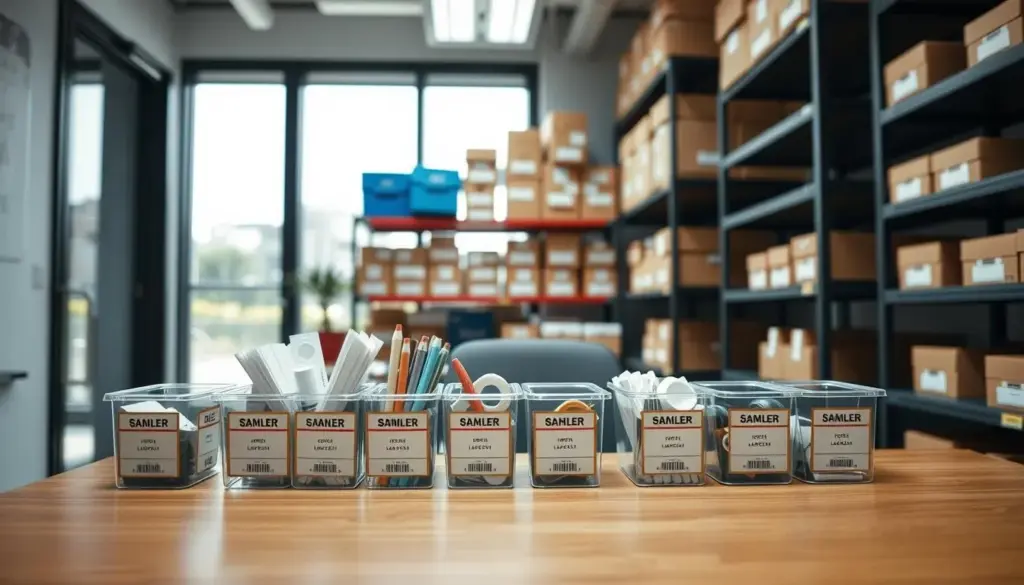
The result is a more predictable process for shared items. A readable label on conference adapters or laptop docks makes check-in and check-out repeatable rather than chaotic.
- Clear tags reduce mistakes like grabbing the wrong cable or returning gear to the wrong cabinet.
- When each category has a defined place, you stop over-ordering and avoid half-used supplies scattered across the office.
- Labels make handoffs easier: anyone covering reception, IT, or mail can find what they need without interrupting others.
Focus labeling where many people touch items — supply closets, mail areas, and copy rooms — and you create a faster, less error-prone system that improves operational efficiency across your team.
Labeling for efficiency: the core principles you should follow</h2>
When labels show only the essentials, team members make quick, correct choices. Use concise wording so anyone decides at a glance and moves on.

Keep information concise so people act quickly
Include only what matters at the moment: what it is, where it belongs, and one short handling note if needed. Too much text slows searches and hides the key action.
Standardize formats across rooms and teams
Apply simple standards: font size, capitalization rules, and color logic. A single naming glossary and templates stop conflicting labels as your system grows.
Place labels at eye level and decision points
Mount tags on cabinet fronts, shelf edges, and doorways near supply zones. Strategic placement speeds scanning and reduces misplacement by busy workers.
Train everyone to read labels the same way
Teach what each format means—ownership, return spot, or check-out rules—and run a brief demo. Consistent practice turns one-time organizing into a lasting system.
- Use bold, high-contrast text and simple symbols to boost scan speed.
- Keep templates uniform so updates are quick and predictable.
- Schedule quick checks to ensure labels stay readable and current.
Label types that work best in office environments and shared spaces</h2>
Picking the right label styles makes it quick to find devices, identify hazards, and track shared gear. Below are practical types you can apply today to cut search time and reduce mistakes.
Equipment identification labels for devices, accessories, and maintenance notes
Use equipment labels on laptops, monitors, docks, headsets, and AV gear. Keep each label scannable: asset ID, department, and a short maintenance note like “Battery replaced 02/2026.”
These labels make it simple to spot ownership and service history at a glance.
Barcode labels for faster check-in, check-out, and audits
Barcode labels speed loaner tracking and audits. Add a barcode and a short ID so your check-out app logs who took an item and when it’s due back.
Use barcode on high-value equipment, shared projectors, and bins that hold many similar accessories. Barcode labels improve accuracy and save time during counts.
Safety and warning labels for potential hazards around equipment and supplies
Bright safety and warning labels highlight battery stations, electrical strips, cleaning chemical storage, and paper cutters. Clear symbols and text reduce accidents and confusion.
Labels help staff spot hazards and follow safe handling. Consistent formats keep safety information readable across rooms and teams.
- Equipment tags: ID, team, short maintenance note.
- Barcode labels: track loans and speed audits.
- Safety/warning: bright colors, symbols, clear text.
How to choose the right labels for your environment and materials</h2>
Match your label choices to the spaces and wear they face so tags last and stay readable. Start by noting how each area is used: cleaning frequency, moisture near sinks, heat by printers, abrasion at drawer edges, and direct sun at windows.
Match label materials to moisture, heat, cleaning chemicals, and wear
Use tougher materials on high-touch drawers and bins. Select chemical-resistant vinyl where disinfectants are common. Pick fade-resistant films for sunlit shelving to prevent loss of legibility.
Adhesives and durability to prevent peeling and fading
Choose strong adhesive for textured cabinets and plastic organizers. Use removable adhesive on temporary boxes and projects so you can swap tags without residue.
Durability saves time: long-lasting bonds reduce relabeling chores and keep records intact.
Custom labels for clearer organization and consistent symbols
Custom labels let you add icons, department color bands, and multilingual text. These visual cues speed recognition and cut decision time.
- Evaluate environment: cleaning, moisture, heat, abrasion, and sunlight.
- Match materials: heavy-duty films, chemical-resistant options, and wipeable finishes.
- Adhesive choices: permanent for assets, removable for rotating supplies.
Choose right by linking tag properties to your needs. If supplies rotate, favor replaceability. If items are fixed, pick long-term adhesion and clear print. Ensuring labels remain readable keeps your system stable and useful after the first months.
Compliance and standards that can affect your labeling system in the US</h2>
When you keep cleaning chemicals, chargers, or shared power stations, your office can trigger safety and compliance questions. Small teams often overlook when a simple tag becomes a regulatory requirement.
When OSHA and ANSI-style communication matters: OSHA and ANSI influence when you must post hazard warnings in work areas. Use these standards when staff may face electrical, chemical, or equipment-related risks. That helps reduce accidents and meet basic regulations.
What “clear and readable” means in practice
Clear means bold fonts, high-contrast colors, and familiar symbols. Readability reduces misinterpretation under time pressure. A concise warning like “Disconnect power before servicing” changes behavior and prevents mistakes.
EnergyGuide: a real example of required disclosures
The FTC’s Appliance Labeling Rule shows how standardized labels guide choice. EnergyGuide labels disclose estimated energy use and ranges among similar models. The Rule also covers some lighting and water-use disclosures, making the format predictable and trustworthy.
- Keep formats consistent so staff learn cues quickly.
- Avoid vague wording; treat safety labeling as controlled operations.
- Use recognized symbols and durable labels near hazards.
How to implement a labeling process that stays accurate over time</h2>
Start by listing every zone and shared item so nothing is missed when you build the system.
Next, map what needs tags: storage areas, supply categories, and shared equipment. This map stops gaps that confuse workers and reduces duplicate names.
Set a simple workflow
Create a lightweight request and approval flow. Note who can request a label, where requests log, who prints them, and who approves naming rules. Keep the steps short and repeatable.
Assign ownership and schedule checks
Assign an owner—office manager or IT lead—so updates happen when items move or teams change. Add a quarterly audit and a quick check after any office move or equipment refresh.
- Use barcode where it speeds check-outs and audits without adding admin burden.
- Run audits to confirm labels meet current needs, stay readable, and avoid errors like duplicate names.
- Keep templates and naming rules fixed so workers find items fast and processes improve operational outcomes.
Common labeling mistakes that waste time and create errors</h2>
Poor tag choices turn helpful cues into confusing clutter at the moment of need. That leads to repeated searches, wrong picks, and lost minutes that add up each day.
Overcrowding labels with too much information
When labels cram in specs and long sentences, people stop reading. Too much text slows decisions and increases errors.
Remove extras first: noncritical specs, long notes, and repeated words. Keep only the action and a short ID so staff decide quickly.
Poor label placement that hides critical details
A tag tucked behind a door, on a curved edge, or too high to see creates missed cues. That is a direct safety issue when a warning is obscured at the moment it matters.
Place tags at decision points and eye level. Make sure safety messages remain visible during normal use.
Using low-quality materials that don’t last
Peeling, fading, and smudging cause trust to erode. Replacing worn tags becomes a recurring task and invites more mistakes.
Proper labeling means readable text, durable stock, and reliable adhesive. Set a minimum standard—material, print quality, and placement rule—to stop repeat problems and save time.
- Quick solutions: simplify content, test placement, upgrade materials.
- Treat readability, consistency, and durability as required steps to reduce errors and protect safety.
Conclusion</h2>
Conclusion
Clear labeling turns guessing into quick, repeatable routines that save time and cut mistakes. Use readable labels and a simple process to make searching fast and predictable.
Better organization reduces friction in shared spaces, keeps supplies where they belong, and makes inventory tasks easier to maintain. That leads to fewer duplicate purchases, faster troubleshooting, and quicker onboarding.
The biggest gains come from consistency: standard formats, strategic placement, and a short update workflow. Start with one high-impact area such as the supply closet or printer station, apply these principles, then expand to equipment and shared storage.
Review tags regularly so your business protects operational efficiency and keeps the system useful as needs change.


